We see a lot of SMS phishing attempts over here, but every once in a while, a text slides into our inbox that is so spectacularly, fundamentally broken, we have no choice but to step back and admire the sheer comedy of it. If you recently received a text alert from lukeflores3092@outlook.com claiming your Apple transaction is locked, congratulations: you’ve been targeted by one of the least logical scams on the internet.
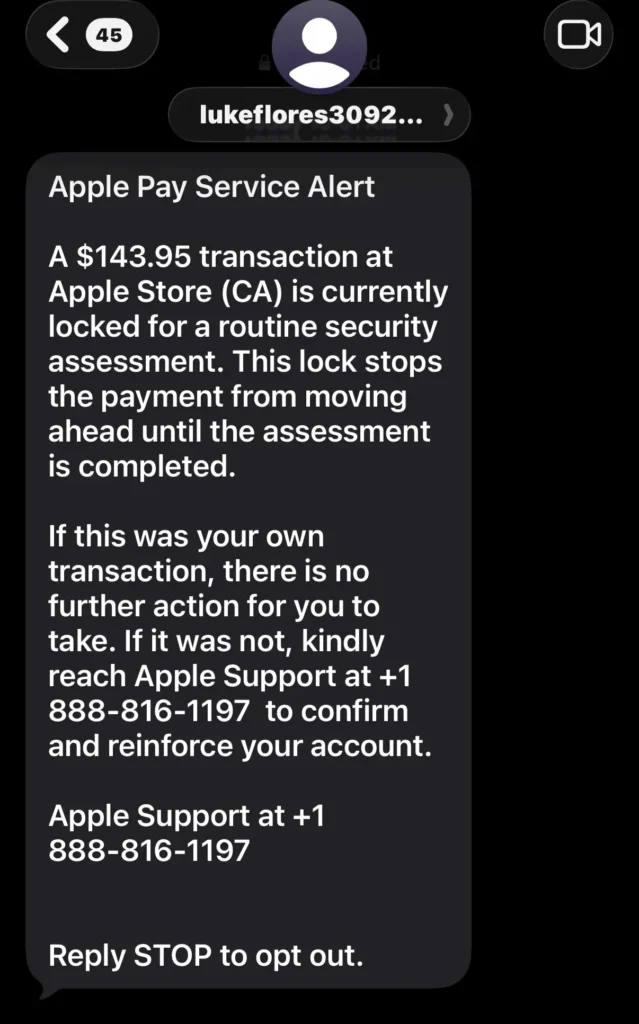
At first glance, the message looks like your typical high-stress fraud warning. But if you take exactly three seconds to actually read the words they wrote, the whole operation falls completely apart into a beautiful display of zero-logic engineering.
The Flaw That Breaks the Space-Time Continuum
Let’s look at the heart of this Apple scam text. The message claims that a $143.95 transaction at the Apple Store is “locked for a routine security assessment.” It then delivers this absolute masterpiece of security advice:
“If this was your own transaction, there is no further action for you to take. If it was not, kindly reach Apple Support…“
Think about that for a second. By telling the victim, “Hey, if you are actually trying to buy this thing, just chill out and do nothing,” the scammer completely breaks the logic of how a fraud alert is supposed to work. Like… am I supposed to just abandon my purchase forever? If I do nothing, my transaction stays locked, and I never get my stuff. It makes absolutely zero sense.
The Dead Giveaways of a Dumb Phish
Beyond the hilarious core logic loop, this text features a textbook lineup of classic red flags:
- The Lukeflores3092 Outlook Address: Take a look at who sent the text. Instead of a short code or an official Apple corporate email address/number, this “Apple Alert” was sent from lukeflores3092@outlook.com. Apple is a multi-trillion-dollar tech giant with its own massive network infrastructure; they are never going to send out automated security alerts from a free, personal Microsoft Outlook email address. Scammers use these standard webmail accounts because they are free, easy to generate in bulk, and can be used to broadcast text messages over the internet to thousands of numbers at once.
- The Billing Blunder: The text claims the transaction is locked at the Apple Store. If a store suspects fraud at checkout, they simply decline the transaction on the spot. They don’t put it in a mysterious customer-service purgatory.
- The “Kindly” Dead Giveaway: The message politely asks you to “kindly reach Apple Support.” It is a well-documented pattern that overseas scam networks heavily rely on the word “kindly” to sound professional. In reality, automated alerts from Silicon Valley tech giants are written by copywriters who prefer direct, clinical language. The moment an automated text gets overly polite, it’s a massive red flag.
- The Fake Number (+1 888-816-1197): The message prominently directs you to call 888-816-1197. Surprise, surprise: a quick check reveals it has absolutely no association with real Apple Support channels. They desperately want you to call this specific line so a live con artist can manually manipulate you into giving up your personal information, passwords, or banking details to “verify your identity.”
The Psychological Trick (That Almost Works)
Why did they design it this way? Because scammers rely entirely on fear and urgency. They know that if you didn’t spend $143.95 at an Apple Store, you are going to panic-read the text. Your brain will skip right past the illogical first half and hyper-focus on the instruction to fix the problem.
The Takeaway from This Apple Scam Text
If you get a text from a weird Outlook address like lukeflores3092@outlook.com claiming to be a major tech brand, enjoy the laugh, but do not interact. Don’t call the number, and whatever you do, do not reply “STOP.” Replying to a scam text simply alerts their system that your phone number is active and monitored by a real human, which will promptly land you on ten more spam lists.
Block the number, delete the thread, and stay sharp!
While You’re Here…
The internet is full of digital vultures right now, but staying informed is your best defense. If you want to see how these operations work behind the scenes, check out our other security breakdowns:
- AT&T 30% Discount Scam: My 65-Minute Call with a Scammer: A step-by-step playbook of how I :tied up a vishing call center for over an hour, and how the “PIN reset” trap works.
- Heads Up: That Experian / FICO Text is a Scam: The anatomy of a clever phishing text that uses the expn.pro domain to trick you into handing over your credit credentials.
- Spotting a Recovery Scam: The Irony of Getting Targeted: What happens when automated bots target my own comment sections to run a secondary scam on vulnerable victims.