We’ve all been there: you open your electric bill at the end of the month, see a massive spike in cost, and wonder, “What on earth did we leave running?” I use Home Assistant as my energy monitor, and it knows how much power is being used at any given time, but I wanted a truly ambient way to know exactly when my house was guzzling power. I didn’t want to constantly glue my eyes to a Home Assistant dashboard or open an app on my phone just to stay informed.
Initially, I went down the DIY rabbit hole to fix this. I went on Printables, downloaded a great .3mf file for an LED desktop lamp, and 3D printed the physical shell. But once the plastic was printed, it just sat on my desk. I kept putting off the actual assembly and wiring because of a nagging thought: I was about to build a custom status lamp that would need to remain powered on 24 hours a day, 7 days a week just to monitor power usage. The irony was hard to ignore…
Instead of building something from scratch, I started putting a lot of deliberate thought into how I could get a physical, ambient indicator without introducing anything new to the house. I spent a few days taking a mental inventory of everything in the house, looking for a device that met three simple criteria:
- It was already plugged in and running 24/7.
- It was in a highly visible, central location.
- It had built-in lights that could change colors.
Then it hit me, I have an ASUS RT-AX82U gaming router that has a front facing RGB light bar sitting in my TV stand; it had been sitting dark since the day I set it up years ago. It was the perfect candidate. It was already consuming power round-the-clock, sat right in our main living area, and a quick check of my Home Assistant integrations confirmed I had total control over its lighting.
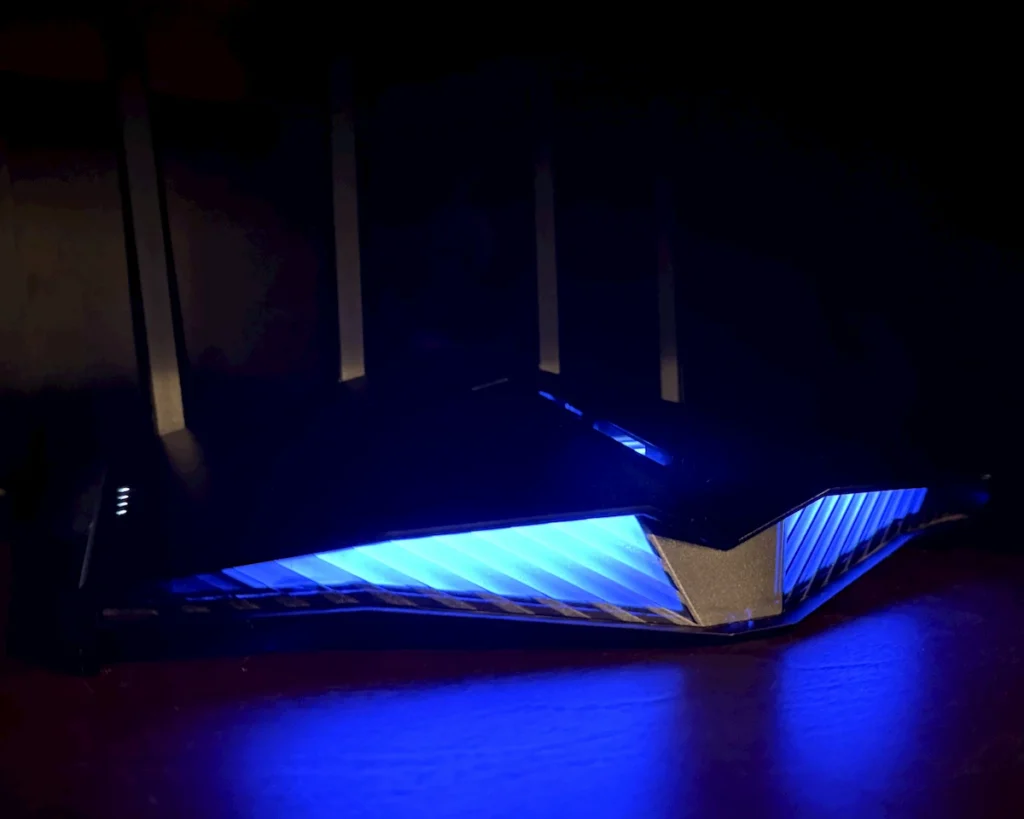
I abandoned the printed lamp project entirely, opened up the Home Assistant interface, and turned the router’s forgotten light bar into the ultimate ambient energy monitor. Now, if my house is running efficiently, the router glows a calm blue. If it spikes to a glaring red, I instantly know it’s time to start shedding power by turning some lights off.
Here is how I did it, why it works so well, and the exact code so you can build it yourself.
Why “Ambient Data” Beats App Alerts
The problem with energy monitoring apps is that they require intent. You have to remember to check them. By the time you get a push notification that your daily usage is high, the energy has already been wasted.
By turning a highly visible piece of hardware, like a router, into a status indicator, the data becomes passive. It sits in the background of your life, yet you still stay informed.
- A glance at the TV stand tells me if we are doing great (Blue/Green).
- Seeing a bright Yellow or Red glow catches my attention immediately, prompting quick, conscious habits like turning off unused lights or checking if the dryer finished and is just running the wrinkle-free cycle now (that notification/automation is for another day)
The Setup: Levels of Power
For my household, I broke my energy usage into four distinct levels based on my sensor.electric_usage_clean data:
- 🔵 Level 1: Blue (Under 1000W): Baseline. The house is essentially asleep. The TV and maybe a few electronics/lights running in the house.
- 🟢 Level 2: Green (1000W to 3000W): Normal life. A few TVs are on, lights are active, maybe the refrigerator is running.
- 🟡 Level 3: Yellow (3000W to 8000W): Heavy lifting. The clothes dryer, oven, or HVAC is pulling real weight.
- 🔴 Level 4: Red (Over 8000W): Peak load. Everything is running at once, and it’s time to start shedding load if we want to save on the next bill!
The Code: The Home Assistant Package
Instead of clogging up my main configuration files, I bundled the entire project into a clean Home Assistant Package. This groups the automation together nicely and keeps my main configuration.yaml clean.
YAML
# ==============================================================================
# PACKAGE: Router Aura Energy Indicator
# Bundles the automation and threshold logic for the RT-AX82U energy light.
# ==============================================================================

automation:
  - alias: "Router Aura: Electric Usage Indicator"
    description: "Changes the ASUS RT-AX82U Aura RGB light color smoothly based on current electricity usage."
    id: router_aura_electric_usage_indicator
    mode: restart
    trigger:
      - platform: state
        entity_id: sensor.electric_usage_clean
    condition:
      # Ensures the state is a valid number before running the logic
      - condition: template
        value_template: "{{ states('sensor.electric_usage_clean') | float(none) is not none }}"
    action:
      - choose:
          # LOW USAGE: Blue (under 1000W)
          - conditions:
              - condition: numeric_state
                entity_id: sensor.electric_usage_clean
                below: 1000
            sequence:
              - action: light.turn_on
                target:
                  entity_id: light.rt_ax82u_aura
                data:
                  rgb_color: [0, 0, 255]
                  brightness: 255


          # NORMAL USAGE: Green (between 1000W and 3000W)
          - conditions:
              - condition: numeric_state
                entity_id: sensor.electric_usage_clean
                above: 999
                below: 3000
            sequence:
              - action: light.turn_on
                target:
                  entity_id: light.rt_ax82u_aura
                data:
                  rgb_color: [0, 255, 0]
                  brightness: 255


          # HIGH USAGE: Yellow (between 3000W and 8000W)
          - conditions:
              - condition: numeric_state
                entity_id: sensor.electric_usage_clean
                above: 2999
                below: 8000
            sequence:
              - action: light.turn_on
                target:
                  entity_id: light.rt_ax82u_aura
                data:
                  rgb_color: [255, 215, 0]
                  brightness: 255


          # CRITICAL/HEAVY USAGE: Red (above 8000W)
          - conditions:
              - condition: numeric_state
                entity_id: sensor.electric_usage_clean
                above: 7999
            sequence:
              - action: light.turn_on
                target:
                  entity_id: light.rt_ax82u_aura
                data:
                  rgb_color: [255, 0, 0]
                  brightness: 255
The Results?
It has been running flawlessly. Putting a lot of thought into finding the right device paid off. Saving myself from building an extra 24/7 power drain and finally putting an unused built-in feature to good use felt like a huge win.
It turns out that gamifying your home utilities actually works. When the router hits the red level, it triggers an instant mental check: Do I really need all of these lights on right now? If you have an ASUS router with HACS integration, or really any smart RGB light bulb sitting in a prominent location, I highly recommend setting this up. It takes 10 minutes, costs nothing if you use what you already own, and actively cuts down your monthly power bill.
What do you use for ambient notifications in your smart home? Let me know in the comments below!